
Data migration is one of the most consequential decisions in any SAP S/4HANA transformation. Get it right and your go-live is clean, your data is trustworthy, and your business runs without disruption. Get it wrong and you are dealing with failed loads, data inconsistencies, and extended timelines that erode confidence in the entire programme.
The challenge is that no single tool does everything. SAP provides several native migration tools, each suited to different scenarios, data volumes, and levels of complexity. Understanding which tool to use, and when to combine them, is what separates a controlled migration from a painful one.
This guide breaks down the core SAP data migration tools available for S/4HANA, compares them clearly, and offers a practical framework for selecting the right approach based on your project context.
Why Data Migration Deserves More Attention Than It Gets
In most S/4HANA programmes, data migration is treated as a workstream rather than a strategic priority. It gets resourced late, scoped too narrowly, and the tool selection often defaults to whatever the team is most familiar with rather than what the project actually requires.
This creates real risk. Organisations migrating to S/4HANA are typically handling data from multiple sources: legacy SAP ECC systems, non-SAP platforms, spreadsheets, and custom databases. Each source brings its own inconsistencies, formatting issues, and gaps. Without the right tooling and governance in place from the start, these problems compound through every migration cycle.
The right tools help you to:
- Cleanse and validate data before it enters the new system
- Transform legacy formats to align with S/4HANA data models
- Run repeatable migration cycles with confidence
- Reduce manual effort and the risk of human error
- Give the business visibility into data quality throughout the process
Choosing the wrong tool, or applying the right tool to the wrong scenario, undermines all of the above.
The Core SAP Data Migration Tools Explained
SAP S/4HANA Migration Cockpit (LTMC)
The Migration Cockpit is SAP’s recommended and strategic tool for S/4HANA data migration. Introduced alongside S/4HANA as SAP’s strategic replacement for legacy migration tooling, it is embedded natively within the platform and carries no additional licence cost — making it the default starting point for most migration programmes.
It operates using predefined migration objects that map to standard SAP business objects such as customers, vendors, materials, and financial records. Data can be loaded via staging tables, Excel-based template files, or direct transfer from an SAP source system.
What it does well:
The Migration Cockpit is purpose-built for S/4HANA. It offers guided, structured migration workflows, built-in validation and error handling, and a user-friendly Fiori interface that reduces the learning curve for SAP teams. For standard migration scenarios, it significantly accelerates delivery.
Where it has limits:
The predefined templates work well for standard objects but can be rigid when custom fields or non-standard business objects are involved. For highly complex or heterogeneous source landscapes, it may need to be paired with additional tooling.
Best used for:
Greenfield S/4HANA implementations, standard data loads, and cloud migrations. For S/4HANA Cloud specifically, it is currently the only SAP-native migration tool available.
LSMW (Legacy System Migration Workbench)
LSMW has been part of the SAP landscape for decades and remains familiar to many SAP practitioners. It uses a rule-based approach to map and transform data from non-SAP systems into SAP, supporting multiple input formats including text files, spreadsheets, and direct database connections.
However, it is important to be clear: LSMW is not supported in SAP S/4HANA Cloud and has significant restrictions in S/4HANA on-premise. SAP explicitly recommends the Migration Cockpit as the strategic replacement. Teams relying on LSMW familiarity for S/4HANA projects are taking on technical risk.
What it does well:
For on-premise S/4HANA environments with limited scope and teams with existing LSMW expertise, it can still be used for specific scenarios. It is flexible for custom object creation.
Where it has limits:
No simulation capability, no monitoring or analytics, and increasing restrictions in the S/4HANA environment. It requires more manual mapping effort than the Migration Cockpit and is not viable for cloud deployments.
Best used for:
Legacy on-premise scenarios only, and only where the Migration Cockpit cannot accommodate a specific requirement. Not recommended as a primary tool for new S/4HANA programmes.
Batch Data Conversion (BDC)
BDC is a traditional SAP method that uploads data by recording and replaying standard SAP transactions. It simulates a user working through a transaction and submits data accordingly.
What it does well:
BDC works for controlled, smaller-scale data loads where data needs to pass through standard transaction logic and business validations. It is useful for scenarios where no BAPI or direct input method is available.
Where it has limits:
BDC is slow relative to modern tools, sensitive to changes in screen layouts, and not suited for high-volume migration. It requires programming effort and becomes difficult to maintain at scale.
Best used for:
Targeted, lower-volume loads in specific technical scenarios. Not a primary migration tool for large S/4HANA programmes.
EMIGALL
EMIGALL is a specialised migration tool used within SAP IS-U (Industry Solution for Utilities). It is designed specifically for utility-sector business objects and high-volume structured data migration in that context.
Best used for:
SAP IS-U implementations and utility industry migrations where industry-specific data structures require dedicated handling.
SAP EIM Data Hub (formerly E-commerce Data Hub)
SAP’s EIM Data Hub functions as an intermediary ETL layer, integrating and staging data from multiple source systems before it is consumed by downstream applications. It prepares and structures data to ensure it is ready for the target environment.
Best used for:
Multi-source integration scenarios where data needs to be consolidated, staged, and structured before migration activities begin.
Tool Comparison at a Glance
Tool | Primary Use Case | Data Volume | S/4HANA Cloud | Complexity | Licence Required |
Migration Cockpit (LTMC) | Standard S/4HANA data loads | Medium to high | Yes (only SAP tool) | Low to medium | No (embedded) |
SAP BODS | Complex ETL and transformation | Very high | Yes | High | Yes |
LSMW | Legacy on-premise loads | Low to medium | No | Medium | No |
BDC | Controlled transaction-based loads | Low | Limited | Medium | No |
EMIGALL | SAP IS-U utility migrations | High | No | Medium | No |
EIM Data Hub | Multi-source staging and integration | Medium to high | Yes | Medium | Yes |
How to Choose the Right Tool for Your Project
There is no universal answer, but the following questions will steer you toward the right decision.
What is your target deployment?
If you are migrating to SAP S/4HANA Cloud, the Migration Cockpit is your only SAP-native option. For on-premise, you have more flexibility.
How complex is your source landscape?
A single SAP ECC source with standard objects is well served by the Migration Cockpit. Multiple non-SAP sources with varied formats and significant cleansing requirements point toward BODS, potentially with the Migration Cockpit handling the final load.
What is the volume and frequency of migration?
High-volume, repeatable migration cycles benefit from the automation and governance that BODS provides. One-off or lower-volume loads are well handled by the Migration Cockpit.
Do you have industry-specific requirements?
Utility organisations on SAP IS-U should evaluate EMIGALL as part of their tooling strategy.
What is your team’s capability?
BODS requires experienced ETL developers. The Migration Cockpit is designed to be accessible to functional teams with SAP knowledge. BDC and LSMW require ABAP familiarity. Be honest about what your team can sustain across multiple migration cycles.
What does your data quality look like?
If data quality is a significant challenge, the answer is to address it upstream before any tool is applied, using profiling and cleansing activities. The Migration Cockpit validates data at load time, but it is not a data quality tool. BODS can apply transformation and cleansing logic as part of the pipeline.
Common Mistakes to Avoid
Defaulting to familiarity over fit.
Many teams reach for LSMW because they know it, without considering whether it is appropriate for an S/4HANA project. Tool selection should be driven by project requirements, not team comfort.
Treating data migration as a late-stage activity.
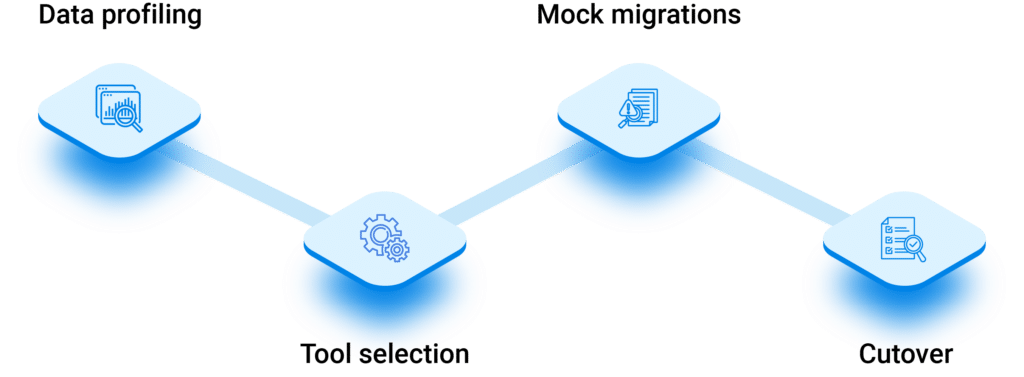
Data migration preparation, including data profiling, cleansing, and mapping, needs to start early. Teams that begin migration workstreams late in the programme consistently run into go-live risk.
Underestimating the number of migration cycles.
A typical S/4HANA programme involves multiple mock migrations before go-live. Your tooling and process needs to be repeatable and efficient across all of them, not just the final cutover.
Skipping simulation and reconciliation.
The Migration Cockpit supports simulation runs; use them. Reconciliation between source and target counts and values should be built into every migration cycle, not treated as an afterthought.
Frequently Asked Questions
What is the recommended SAP tool for S/4HANA data migration?
SAP recommends the S/4HANA Migration Cockpit as the primary tool for data migration to S/4HANA. It is embedded in the system, requires no additional licence, and provides predefined migration objects, templates, and guided workflows suited to standard migration scenarios.
Is LSMW still supported in SAP S/4HANA?
LSMW is not supported in SAP S/4HANA Cloud and has significant restrictions in S/4HANA on-premise. SAP positions the Migration Cockpit as its strategic replacement. For new S/4HANA programmes, LSMW should not be the primary migration tool.
When should I use SAP BODS instead of the Migration Cockpit?
BODS is the right choice when your migration involves complex data transformation, large volumes from multiple or non-SAP sources, or significant data quality challenges that need to be resolved as part of the migration pipeline. For straightforward standard object migrations, the Migration Cockpit is typically sufficient and more efficient.
Can I use multiple tools in the same migration programme?
Yes, and this is common in complex programmes. A typical approach might use BODS to extract and transform data from multiple sources, stage it, and then use the Migration Cockpit to execute the final load into S/4HANA. Tool combinations should be designed based on the specific requirements of each data object.
What is the difference between staging tables and direct transfer in the Migration Cockpit?
Staging tables involve loading data into temporary tables in the SAP HANA database, where it can be validated and checked before being committed to the live system. Direct transfer pulls data directly from a connected SAP source system. Staging tables provide a safer buffer for validation; direct transfer is faster and suited to system conversion scenarios.
How early should data migration activities begin in an S/4HANA programme?
Data migration preparation should begin at the start of the project, not at the midpoint. Data profiling and quality assessment, object scoping, and tool selection should all be completed during the project preparation and blueprinting phases. Late starts are one of the most consistent causes of go-live delays in S/4HANA programmes.
Choosing the right SAP data migration tool is not a technical afterthought. It is a foundational decision that shapes the reliability, efficiency, and confidence of your entire S/4HANA transformation.
The Migration Cockpit should be your starting point for most S/4HANA programmes. BODS earns its place when complexity demands it. LSMW belongs in the past for the vast majority of new projects. And no tool substitutes for a well-planned, early-stage data strategy that addresses quality, governance, and repeatability from day one.
At Acuiti Labs, we work with organisations at every stage of the SAP data migration journey, from tool selection and data assessment through to cutover execution and post-go-live validation. If you are planning an S/4HANA migration and want to understand which approach is right for your landscape, get in touch with our team.